
A good expense management system helps businesses track company spending, collect receipts, enforce approval policies, and reimburse employees without relying on spreadsheets or endless email follow-ups. For Nigerian businesses, it should also fit existing payment processes, accounting systems, and employee management workflows.
As a business grows, expenses become harder to manage manually. Employees may request money for transport, fuel, internet subscriptions, accommodation, or client meetings. Finance teams must verify receipts, confirm that spending was authorised, route requests to the right approvers, and ensure payments are recorded correctly.
This guide compares seven options: Salario Expense, Zoho Expense, Flex Finance, Duplo, Expensify, SAP Concur, and Sage Expense Management. Each serves different needs, from employee reimbursements and local business spending to international travel and enterprise expense control.
7 best expense management software for Nigerian businesses
| Software | Best for | Main strength |
| Salario Expense | Nigerian businesses connecting employee expenses to payroll | Expense requests, approvals, reimbursement, payroll, and accounting workflows |
| Zoho Expense | SMEs and businesses using Zoho applications | Expense reporting, receipt capture, policies, and travel management |
| Flex Finance | Businesses that need spend controls and payment workflows | Expense accounts, approval workflows, expense cards, and bulk payments |
| Duplo | Businesses managing expenses alongside finance operations | Expense management, reimbursements, vendor payments, and reconciliation |
| Expensify | Teams that need mobile expense reporting and receipt scanning | Automated expense reports, card reconciliation, and reimbursements |
| SAP Concur | Larger organisations with complex travel and expense requirements | Travel and expense management, policy controls, and enterprise integrations |
| Sage Expense Management | Businesses using Sage’s accounting or HR solutions | Employee expense recording, reporting, and financial system connectivity |
1. Salario Expense: Best for connecting employee expenses to payroll
Salario Expense is designed to help businesses manage employee expenses through a structured process that connects requests, receipts, approvals, reimbursement, payroll, and accounting.
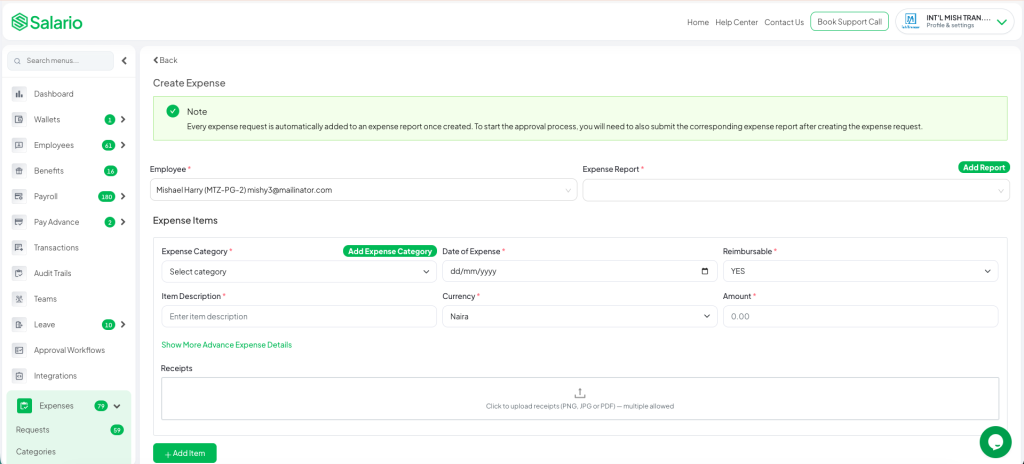
Instead of keeping expense requests in spreadsheets, email threads, and messaging apps, employees can submit expenses in one place and track their status. Administrators can review requests, check supporting documents, and follow each expense through the approval and reimbursement process.
Key features
- Expense requests and receipt management: Employees submit expense details and attach supporting receipts.
- Multi-level approvals: Route requests through line managers, department heads, Finance, and authorised payment approvers.
- Expense policies: Organise expenses by category and apply spending limits and approval requirements.
- Payroll reimbursement: Connect eligible employee reimbursements to payroll workflows.
- Direct expense payouts: Support reimbursement through direct payments where applicable.
- Accounting synchronisation: Keep expense records connected to accounting workflows.
- Employee records and audit trail: Maintain expense histories and trace requests through their approval and reimbursement stages.
These capabilities are described in Salario’s employee expense management guide.
Why choose Salario?
Salario’s main advantage is its focus on the employee expense lifecycle. An expense claim does not end when a manager approves it. Finance still needs to ensure the employee receives the correct amount and that the payment is reflected in the appropriate records.
By connecting expense requests with employee records, payroll, payments, and accounting, Salario can help reduce manual handoffs between HR and Finance. This is particularly useful for businesses that already manage employee compensation and payroll through Salario.
What should you consider?
Before adopting Salario, map your existing expense process to its approval and reimbursement workflows. Confirm how your organisation handles different expense categories, spending limits, direct payments, and payroll reimbursements.
Verdict: Salario is worth considering if you want employee expense management to work alongside payroll and workforce processes rather than operate as an isolated expense tracker.
2. Zoho Expense: Best for SMEs and businesses using Zoho
Zoho Expense is an expense management platform that helps businesses record employee spending, automate expense reports, enforce policies, and process reimbursements. It is especially relevant to businesses already using applications in the Zoho ecosystem.
Key features
- Receipt capture: Capture receipt details and reduce manual data entry.
- Expense reports: Create, submit, review, and track expenses.
- Approval workflows: Configure hierarchical or multi-stage approval processes.
- Expense policies and budgets: Set rules, spending limits, and controls for different teams.
- Mileage and per diem: Track business travel and apply relevant allowance rules.
- Corporate card management: Import and reconcile supported card transactions.
- Accounting and payroll integrations: Connect expense information with supported business applications.
Zoho documents these capabilities on its official expense management features page.
Why choose Zoho Expense?
Zoho Expense offers a broad set of tools for businesses that need more than basic expense submission. Employees can submit expenses, managers can review claims, and finance teams can use reports to monitor spending and identify policy violations.
Its integration with other Zoho applications can also reduce duplicated work for businesses already using Zoho for accounting, CRM, projects, or HR.
What should you consider?
Some features and integrations depend on the edition, connected applications, and region. Confirm that your preferred accounting or payroll setup is supported and that reimbursement workflows suit your Nigerian operations.
Verdict: Zoho Expense is a strong option for SMEs that want structured expense reporting, policy controls, and integration with the wider Zoho ecosystem.
3. Flex Finance: Best for spend management and business payments
Flex Finance focuses on helping businesses control company spending and manage finance workflows. Alongside expense tracking, it provides tools for expense accounts, approval processes, expense cards, and bulk payments.
Key features
- Expense accounts: Create and manage accounts for teams and individuals.
- Approval workflows: Manage requesters, approvers, and people responsible for disbursing funds.
- Expense tracking: Categorise transfers and expense requests as transactions occur.
- Expense cards: Issue cards for eligible team spending, including international payments.
- Bulk payments: Transfer money to multiple recipients.
- Tax and record organisation: Keep expense records, receipts, and invoices organised for financial reporting and audit preparation.
These features are listed on Flex Finance’s official website.
Why choose Flex Finance?
Flex is useful for businesses that need to control spending before and during a transaction, not just review receipts after money has been spent. Expense accounts and approval workflows can help organisations establish who can request funds, who must authorise spending, and how transactions are recorded.
Its payment features also make it relevant to companies that regularly disburse money to employees, vendors, or other recipients.
What should you consider?
Flex’s broader spend-management approach may be more than a business needs if its only requirement is employee reimbursement. Compare its expense controls with your actual workflows, and confirm how its records connect to your accounting and payroll systems.
Verdict: Consider Flex Finance if your business wants expense controls, payment workflows, and visibility into spending within a wider finance platform.
4. Duplo: Best for expenses and wider finance operations
Duplo is a financial operations platform that combines expense management with business payments, vendor workflows, reconciliation, and other finance tools. It is relevant to companies that want to manage employee claims alongside broader operational spending.
Key features
- Expense management: Organise and track business expenses.
- Approval workflows: Route requests through defined approval processes.
- Reimbursements: Manage employee expense claims and their settlement.
- Vendor and accounts payable workflows: Support business payments beyond employee claims.
- Bulk payments: Pay multiple recipients through supported payment workflows.
- Reporting and reconciliation: Improve visibility into transactions and match payments with financial records.
- Accounting integrations: Connect supported workflows with systems such as QuickBooks and Xero.
Duplo’s product and pricing information describes its expense management, approval, reimbursement, and financial operations features.
Why choose Duplo?
Duplo may be a good fit when expense claims are only one part of a larger finance challenge. For example, a company may need to reimburse employees, pay suppliers, manage collections, and reconcile transactions. Managing these processes within a connected financial operations platform can reduce fragmentation.
What should you consider?
If employee expense claims are your main concern, evaluate how well Duplo handles the employee-specific parts of the process, including receipts, approvals, reimbursement status, and the records Finance needs. Confirm which integrations are available for your accounting system and whether additional transaction or subscription fees apply.
Verdict: Duplo is worth considering for businesses that want expense management alongside business payments and broader finance operations.
5. Expensify: Best for mobile expense reporting and receipt capture
Expensify helps businesses automate expense reporting, collect receipts, manage approvals, and reimburse employees. Its receipt-scanning and mobile workflows are particularly useful for teams that spend money while travelling or working away from the office.
Key features
- Receipt scanning: Capture receipts using a mobile device, email, or uploaded files.
- Expense reports: Create and submit expense reports with less manual entry.
- Automated approvals: Review claims and apply policy checks.
- Card reconciliation: Connect supported corporate cards and match transactions with expenses.
- Reimbursements: Support employee and contractor reimbursements, including international reimbursements.
- Travel management: Connect travel bookings with expense records.
- Accounting integrations: Synchronise reports with supported accounting applications.
Expensify describes these capabilities on its official website.
Why choose Expensify?
Expensify is a practical option for teams that generate many receipts and expense reports. Its scanning and automation features can reduce the time employees spend entering expense details and the time finance teams spend checking individual reports.
It can also suit businesses with travelling employees or international teams that need to manage expenses across locations.
What should you consider?
Some payment and card features are region-specific. Confirm which services are available to your Nigerian business, what currencies and reimbursement routes are supported, and whether your existing accounting system can connect as required.
Verdict: Expensify is worth evaluating if mobile receipt capture, automated expense reports, and travel-related spending are central to your needs.
6. SAP Concur: Best for enterprise travel and expense management
SAP Concur is an enterprise-oriented platform for managing employee expenses and business travel. It is designed for organisations that need structured policies, approval routing, audit controls, reporting, and integration with wider financial systems.
Key features
- Receipt capture: Use supported tools to extract information from receipts.
- Expense reports: Create, review, and approve reports.
- Policy enforcement: Apply spending rules and flag potential policy violations.
- Corporate card integration: Import transactions from supported card providers.
- Travel and expense integration: Connect business travel bookings with expense reporting.
- Approval routing and audit logs: Route expenses to authorised approvers and maintain records of approval activity.
- Enterprise integrations: Connect with supported ERP, HR, and accounting systems.
These capabilities are outlined in SAP Concur’s official product information.
Why choose SAP Concur?
SAP Concur is particularly relevant to organisations with frequent business travel, multiple departments, complex approval structures, or formal expense audit requirements. It brings travel and expense processes together and can connect them to existing enterprise systems.
What should you consider?
SAP Concur may be more extensive than a small business needs. Implementation, integration, administration, and licensing should be assessed against the scale of your operations. Nigerian businesses should also confirm the availability of required payment services, local support, and integrations with their existing financial systems.
Verdict: SAP Concur is worth considering for larger organisations with complex travel and expense processes that need enterprise-level controls.
7. Sage Expense Management: Best for businesses using Sage solutions
Sage provides expense management capabilities within its wider financial and business software offering. These tools help businesses record employee spending, collect receipts, manage claims, and improve the flow of expense information into financial reporting.
Key features
- Expense recording: Capture employee expenses and reduce reliance on manual reports.
- Mobile receipt submission: Allow employees to upload receipts and submit claims while away from the office.
- Approvals and permissions: Control who can submit, view, and approve expenses.
- Reporting: Review spending and expense information through reporting tools.
- Financial system connectivity: Connect expense information with supported Sage products and accounting workflows.
Sage’s Nigeria expense management page describes expense management capabilities and its wider HR and payroll offering.
Why choose Sage?
Sage may suit businesses already using Sage products for accounting, finance, or HR. Keeping expense information connected to existing financial systems can reduce duplicate entry and help finance teams maintain consistent records.
What should you consider?
Sage’s available expense features depend on the particular product and configuration. Confirm which Sage solution you would be buying, whether it includes the expense functions you need, and how it connects to your existing accounting or payroll setup.
Verdict: Sage is worth evaluating if your business already uses Sage and wants expense processes to fit into its wider financial software environment.
How to choose the right expense management software
Before making a decision, compare each platform against five practical requirements.

- Expense submission and receipts: Can employees submit requests and attach supporting documents easily?
- Approval controls: Can you route requests to the right managers and enforce spending limits?
- Reimbursement and payments: Can you track approved expenses through to payment and confirm their status?
- Accounting and payroll integration: Will the expense records reach the systems your Finance and HR teams already use?
- Total cost and complexity: Do subscription fees, integrations, implementation, and administration make sense for your business size?
The right platform should reduce manual work without adding unnecessary complexity. It should also give employees a clear way to submit claims and check their status, while giving Finance enough control to monitor spending and maintain accurate records.
Frequently asked questions
What is the best expense management software in Nigeria?
The best option depends on your business needs. Salario is worth considering for employee expenses connected to payroll and workforce processes. Zoho Expense suits businesses looking for expense reporting and policy controls, while Flex Finance and Duplo offer broader spend-management and payment workflows. Expensify focuses on expense reporting and receipt capture, SAP Concur targets complex enterprise travel and expense needs, and Sage may suit existing Sage users.
Can expense management software automate employee reimbursements?
Some platforms support reimbursement workflows and payments, but the exact process varies. Confirm whether the software can pay employees directly, send approved claims to payroll, or requires an external payment or accounting workflow.
Is expense management software useful for small businesses?
Yes. It can help small businesses reduce missing receipts, delayed approvals, unclear spending responsibilities, and manual reconciliation. Choose a platform that matches the complexity of your expenses rather than paying for enterprise features you will not use.
Can expense management software integrate with accounting or payroll?
Many platforms offer integrations with supported accounting, ERP, or payroll systems. However, not every integration works with every regional setup. Confirm compatibility with your current software and test the complete workflow before committing.
Final thoughts
The best expense management software should make company spending easier to track, approve, reimburse, and report. But the right choice depends on whether you need a dedicated expense reporting tool, broader spend controls, or a system that connects employee expenses with payroll and accounting.
Zoho Expense and Expensify offer structured expense reporting, while Flex Finance and Duplo bring expense management into broader financial operations. SAP Concur is suited to complex travel and expense programmes, and Sage is worth evaluating for businesses already using Sage products.
For Nigerian businesses looking to connect employee expenses with approvals, reimbursement, payroll, and accounting, Salario Expense offers a workforce-centred approach to expense management.
Want to simplify expense requests, approvals, and reimbursements? Book a demo with Salario to see how its expense management workflow could fit your business.