

QuickBooks is a household name in the accounting world, acting as a reliable solution to a myriad of accounting tasks many account officers and bookkeepers find difficult. In fact, QuickBooks Online, the cloud platform has more than 5.3 million users worldwide. This number is growing in Nigeria as their reliable service makes it easier for businesses across the nation to handle their accounting concerns.
In our experience handling client requests though, one major concern we come across with businesses using QuickBooks Online in Nigeria is how they have to manually handle payroll and connect this expense within their QuickBook Online accounts. This for them is a major inconvenience that costs time and slows down overall accounting processes.
To help solve this problem, we at Salario have provided a QuickBooks online integration that links our payroll processing software with QuickBooks online and eases information exchange between both platforms. We have successfully integrated with HR solutions like Zoho People and Odoo in the past, and understand the value our clients get. In this blog piece we will show you how you can sync salario payroll records with QuickBooks Online. But first, how bad can the manual process be for businesses?
How Is Manual Payroll Syncing with QuickBooks Online Costing Nigerian Businesses Time and Money?
For many Nigerian businesses, using QuickBooks Online has simplified accounting and financial reporting. However, when payroll isn’t automatically linked to the platform, it creates a frustrating bottleneck. HR teams process payroll in one system, then manually input the data into QuickBooks, a process that consumes hours each month and increases the risk of costly mistakes.
Time-consuming data entry is one of the biggest culprits. Each pay period, finance teams must key in employee salaries, statutory deductions, and benefits individually. This not only eats into valuable time but also slows down other strategic finance tasks.
Then there’s the risk of errors and mismatched records. A single mistyped figure or missed deduction can throw off reconciliation reports, delay approvals, and even create compliance issues.
Finally, month-end reporting becomes a race against time. Instead of seamless data flow between payroll and accounting, businesses face duplicated work and unnecessary delays. For growing companies managing multiple teams or branches, these inefficiencies quickly add up, costing both time and money.
With Salario’s QuickBooks Online integration, this tedious manual process becomes automated, saving hours and ensuring accurate, real-time updates between both platforms.
Overview of Salario and QuickBooks Integration
Salario’s integration with QuickBooks Online was built to eliminate the manual, error-prone process of re-entering payroll data into accounting software. By connecting both platforms through a secure API, Nigerian businesses can now enjoy seamless communication between their payroll and accounting systems, saving time, improving accuracy, and ensuring real-time visibility into their financial data.

Once connected, every payroll run in Salario automatically reflects in your QuickBooks Online account. This means your HR and finance teams no longer need to juggle spreadsheets or upload CSV files to keep both systems aligned. The integration works quietly in the background, updating records in seconds and allowing you to focus on what truly matters, running your business efficiently.
Here’s what this integration allows you to do:
- Real-time syncing of payroll data: Instantly update payroll entries in QuickBooks Online whenever payroll is processed in Salario.
- Automatic posting of expenses: Salary payments, taxes, pensions, and benefit deductions are automatically recorded under the right expense accounts.
- Simplified reconciliation and reporting: Both HR and finance teams can access consistent, accurate data for audits and month-end financial reports.
- Secure data transfer: All information shared between Salario and QuickBooks Online is encrypted, ensuring compliance with data protection standards.
- Quick setup with minimal configuration: Connecting Salario to QuickBooks Online takes just a few steps, with no technical expertise required.
With this integration, businesses finally have a unified system where payroll and accounting speak the same language, simple, secure, and synced in real time.
Key Benefits of Syncing Salario Payroll with QuickBooks Online
Integrating Salario with QuickBooks Online does more than just save time, it transforms how your HR and finance teams collaborate. By automating data flow between both platforms, businesses eliminate the inefficiencies of manual work while ensuring accuracy, compliance, and clarity across every financial record.
Here are the key benefits you can expect when you sync Salario payroll records with QuickBooks Online:
- Eliminate Manual Entries: Automatically create and post journal entries from each payroll run, removing the need to manually re-enter data into QuickBooks Online.
- Real-Time Sync: Every approved payroll in Salario is instantly reflected in QuickBooks Online, ensuring your books are always up to date.
- Accurate Books: Minimize the risk of errors or mismatched records between HR and finance teams, guaranteeing that payroll data and expense reports always align.
- Easy Compliance: Payroll components such as taxes, pensions, and statutory deductions are automatically categorized, helping you stay compliant with Nigerian regulations.
- Simplified Auditing: Every payroll transaction is traceable and verifiable, making audits faster, simpler, and more transparent.
By syncing Salario with QuickBooks Online, Nigerian businesses gain a streamlined, error-free workflow that keeps both payroll and accounting perfectly in sync, from processing salaries to preparing financial statements.
Step-by-Step Guide: How to Connect Salario to QuickBooks Online
Setting up the integration between Salario and QuickBooks Online is quick and straightforward. You don’t need any technical background, just follow these simple steps to get your payroll and accounting systems working together seamlessly:
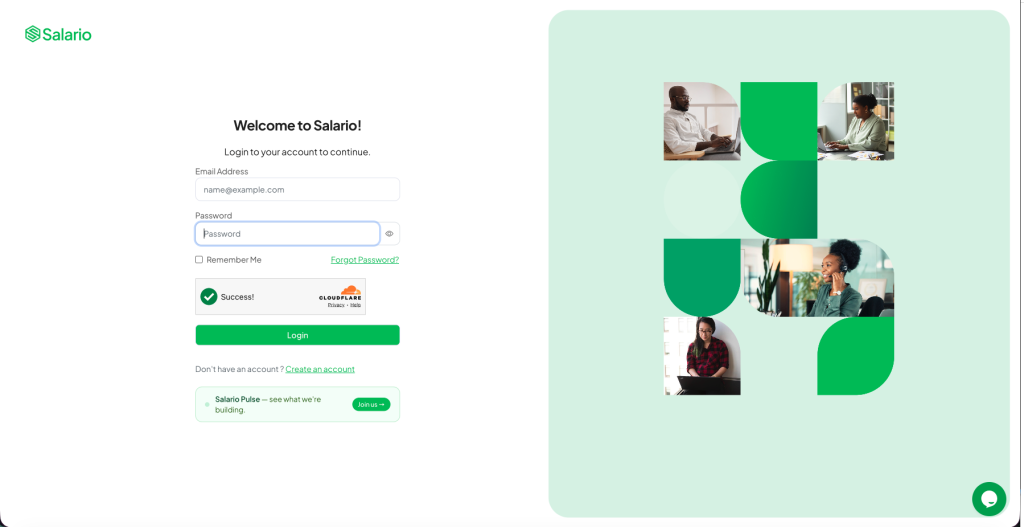
1. Login to Salario
Start by signing in to your Salario account. Go to the Settings menu and select Integrations.
2. Select QuickBooks Online
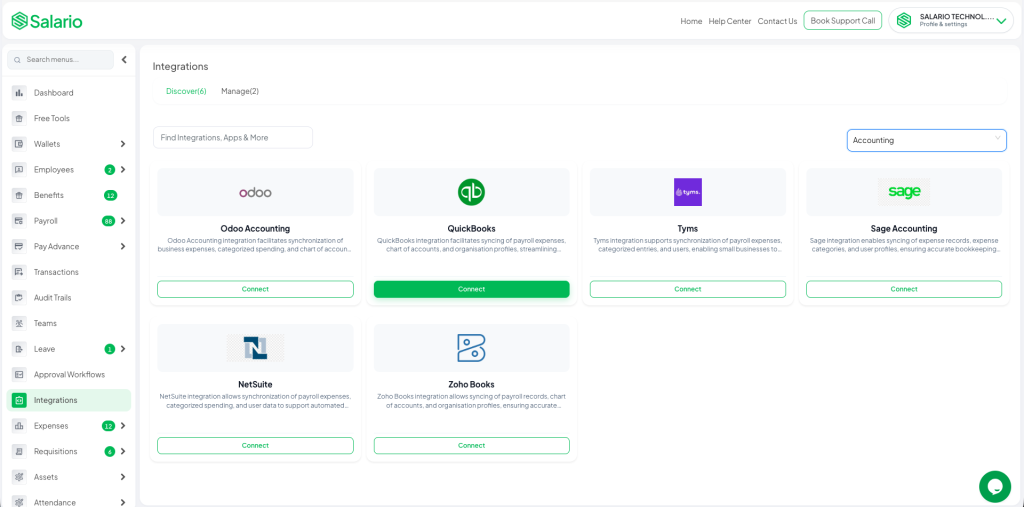
From the list of available integrations, choose QuickBooks Online and click Connect.
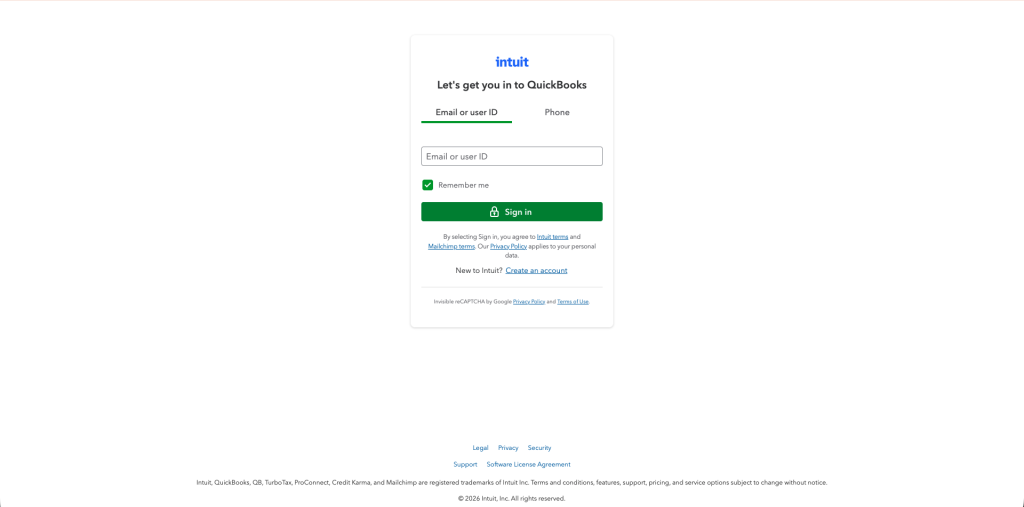
3. Authenticate via QuickBooks
You’ll be redirected to a secure QuickBooks login page. Sign in with your company’s admin account to authorize the connection.
4. Map Payroll to Chart of Accounts
Choose how you want your payroll data to appear in QuickBooks. Map key components like salaries, pensions, taxes, and benefits to the appropriate expense or liability accounts.
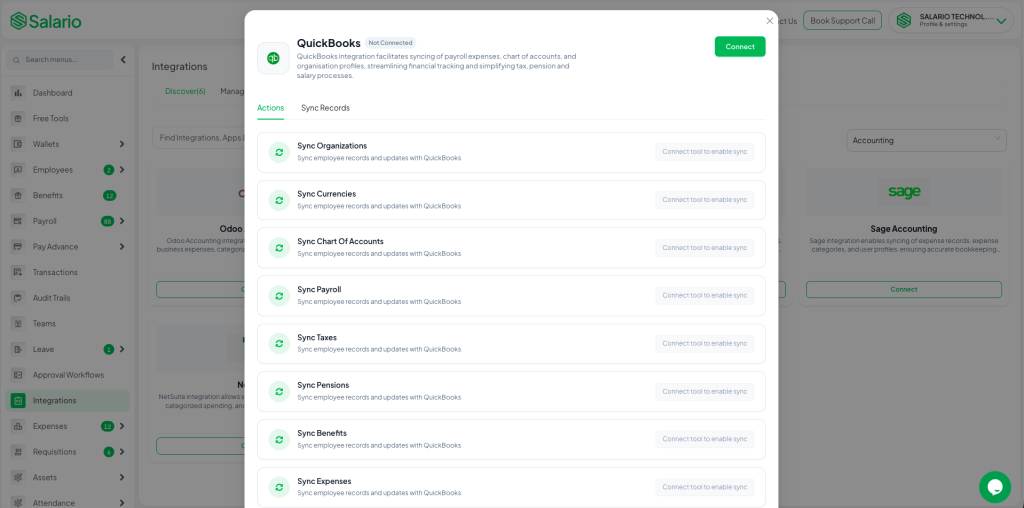
5. Enable Auto Sync
Toggle on Auto Sync to allow Salario to automatically post journal entries to QuickBooks Online after each payroll run.
6. Verify Sync
Once enabled, view and confirm your synced payroll transactions directly from your QuickBooks dashboard.
That’s it, your Salario payroll records are now synced with QuickBooks Online. Every time you process payroll, your books stay accurate and up to date automatically.
Quick Case Study: How a Payroll Sync Looks in QuickBooks
To better understand how Salario’s integration with QuickBooks Online works, let’s look at a simple example of how a payroll run appears once synced. After processing payroll in Salario, the system automatically posts journal entries to your QuickBooks account, no manual uploads or data entry required.
A typical payroll journal might look like this:
Debit: Salary Expense
Debit: Pension Expense
Credit: Payroll Payable
Credit: Tax Payable
Each line item is automatically mapped to the correct chart of accounts based on the preferences you set during integration. This ensures that every payroll expense, deduction, and tax liability is accurately reflected in your financial records.
By having payroll entries synced in real time, HR and finance teams can instantly see the full payroll impact on company books. This eliminates end-of-month reconciliation struggles, reduces reporting time, and ensures your financial statements are always ready, accurate, compliant, and stress-free.
Conclusion
Manually managing payroll and accounting can be overwhelming, especially when accuracy and compliance are on the line. With Salario’s QuickBooks Online integration, businesses can finally bridge the gap between HR and finance. Every payroll run automatically updates your accounting books, eliminating double entry, reducing errors, and saving valuable time.
Whether you’re managing a growing team or overseeing multiple branches across Nigeria, syncing Salario payroll records with QuickBooks Online ensures that your financial data remains organized, transparent, and always up to date. You no longer have to wait until month-end to reconcile records or worry about mismatched accounts; everything stays aligned in real time.
Want to see how this works for you? Book a quick demo with Salario today and see firsthand how easy it is to sync your payroll records with QuickBooks Online, saving time, improving accuracy, and giving you complete confidence in your books.