
Zoho Invoice is one of the most trusted billing and invoicing tools globally, helping businesses streamline their financial operations with ease and precision. Known for its user-friendly interface, customizable invoicing, and automation capabilities, Zoho Invoice has become an essential tool for many Nigerian businesses, helping them manage client billing, payments, and expense tracking.
However, for companies that also need to handle employee payments, payroll expenses, and pension remittances, Zoho Invoice alone doesn’t cover it all. Many Nigerian SMEs find themselves manually entering payroll data into Zoho after every pay run, a time-consuming process that often leads to errors, duplicate entries, and delayed remittances.
To address this challenge, Salario has introduced seamless integration that automatically syncs employee payments with Zoho Invoice for Nigerian businesses. This connection bridges the gap between payroll and invoicing, automating expense entries and ensuring accurate pension remittances without extra effort.
In this guide, we’ll explore why this integration matters, how it saves businesses time and money, and walk you through the step-by-step process to sync employee payments to Zoho Invoice with Salario.
How Manual Payroll and Pension Remittance Cost Nigerian Businesses Time and Money
For many businesses, Zoho Invoice has simplified how they handle client billing and receivables. But when it comes to managing employee-related payments and payroll expenses, manual syncing remains a hidden bottleneck that drains valuable time and increases financial risk.
Here’s why:
1. Manual data entry takes too much time
Every payroll cycle, HR or finance teams must enter employee salary figures, pension deductions, and tax remittances into Zoho Invoice by hand. This process not only consumes several hours each month but also slows down other critical accounting tasks.
2. Human error is inevitable
Even the most diligent accountants make mistakes when copying figures between systems. A misplaced decimal or skipped deduction can cause reconciliation issues, inaccurate reports, or compliance problems down the line.
3. Delayed pension remittances hurt compliance
Under Nigerian pension laws, timely remittance is mandatory. When payroll data isn’t synced automatically, delays in processing or miscalculations can expose businesses to penalties and affect employee trust.
4. Month-end reporting becomes chaotic
Finance teams often spend days reconciling payroll expenses with invoices and remittance records, making financial closing more stressful than it should be.
With Salario’s Zoho Invoice integration, these manual challenges disappear. The system automatically syncs payroll data, including salaries, taxes, and pensions, directly into Zoho Invoice in real time. The result? Accurate financials, faster month-end processes, and fully compliant remittance.
Overview of the Salario and Zoho Invoice Integration
The integration between Salario and Zoho Invoice was explicitly designed for Nigerian businesses that want to connect payroll operations with invoicing and expense tracking.
By linking the two platforms, Salario automates the flow of payroll information into Zoho Invoice, eliminating double entry, reducing errors, and keeping pension remittance records up to date. Once connected, every payroll action in Salario reflects instantly in Zoho Invoice, ensuring your books remain synchronized and accurate at all times.
Here’s what the Salario–Zoho Invoice integration enables you to do:
- Automatic payroll data syncing: Every time you process payroll in Salario, salaries, taxes, and pension contributions are automatically updated in Zoho Invoice.
- Seamless pension remittance: Salario’s compliance engine ensures pensions are calculated correctly and reflected in Zoho Invoice as part of your monthly payroll expenses.
- Accurate expense tracking: All payroll-related costs are posted under the appropriate expense categories in Zoho Invoice, simplifying financial management and reporting.
- Real-time data synchronization: The integration ensures that HR and accounting teams always see the same, updated data.
- Quick setup and secure connection: The integration can be set up in just a few clicks, with secure authorization and no technical expertise required.
With this integration, Nigerian businesses can finally manage payroll, pensions, and accounting from a unified, simple, secure, and automated system.
Key Benefits of Syncing Employee Payments to Zoho Invoice with Salario
Integrating Salario with Zoho Invoice goes beyond convenience; it transforms how your business handles payroll and financial reporting. By automating payment syncing and pension remittance, you gain accuracy, compliance, and control across your entire payroll process.
Here are the key benefits Nigerian businesses can expect:
1. Eliminate Manual Data Entry
Say goodbye to re-entering employee salary figures into Zoho Invoice after every payroll run. Salario automatically posts journal entries and updates expense records, saving hours each month.
2. Real-Time Syncing
Every approved payroll in Salario instantly reflects in Zoho Invoice. Your books remain accurate, and pension liabilities are recorded the moment payroll is processed.
3. Improved Compliance
Salario handles complex local deductions, including PAYE, NHF, and pension contributions, in accordance with Nigerian regulations. These deductions are properly categorized and synced to Zoho Invoice, ensuring your records meet FIRS and PenCom standards.
4. Simplified Pension Remittance
One of the most powerful benefits of this integration is automated pension remittance. After payroll is processed, Salario ensures pension contributions are correctly deducted and synced into Zoho Invoice, so you can remit easily without juggling spreadsheets.
5. Faster Month-End Reporting
With all payroll expenses and pension liabilities synced automatically, financial reporting becomes faster and more transparent. Auditors and finance teams have complete visibility, reducing time spent reconciling data.
6. Reduced Errors and Discrepancies
Automation minimizes the risk of mismatched figures between HR and accounting. You get accurate reports every time, no more double-checking CSV uploads or adjusting accounts manually.
7. Scalable for Growth
As your business grows, Salario scales with you. Whether you’re handling 10 employees or 1,000, syncing employee payments to Zoho Invoice remains smooth and instant.
Step-by-Step Guide: How to Sync Employee Payments to Zoho Invoice with Salario
Setting up this integration is fast, straightforward, and doesn’t require any technical background. Follow these simple steps to connect both platforms and start automating your payroll expense syncing and pension remittances:
Step 1: Connect Zoho Invoice to Salario
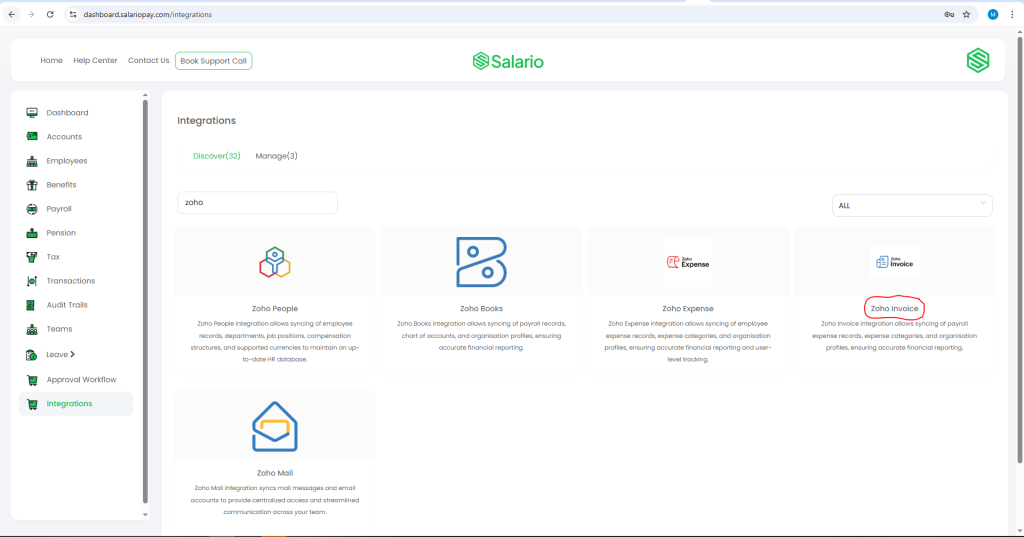
- Log in to your Salario account.
- From the left-hand menu, click Integrations.
- Search for Zoho Invoice in the list of available apps and select it.
- Click Connect, you’ll be redirected to Zoho’s secure authentication page.
- Review the consent screen and click Accept to authorize access.
- Once approved, the connection between Zoho Invoice and Salario will be established.
Step 2: Sync Payroll Data
After the connection is active, Salario automatically imports key data from Zoho Invoice, including:
- Organizations
- Currencies
- Chart of Accounts
- Payroll components (Salaries, Taxes, Pensions)
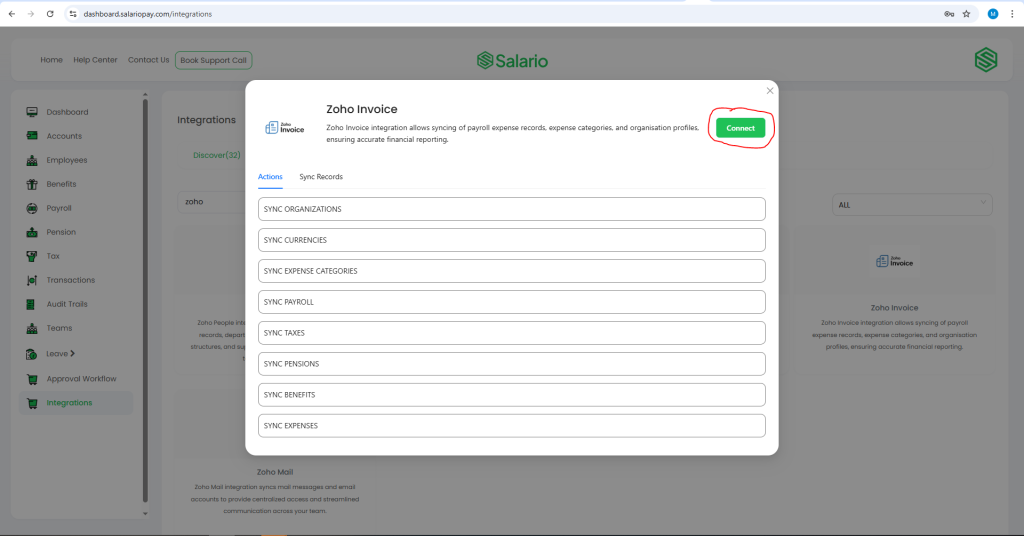
You can also run manual syncs (“Push” or “Pull”) at any time to ensure both systems stay fully updated.
Step 3: Remit Payroll and Pensions via Salario
- From the left-hand menu in Salario, click Payroll.
- Select Remit Payroll.
- Choose the following details:
- Start Date
- End Date
- Account to Debit
- Pay Group (optional)
- Click Continue to view your Payroll Summary.
- Review all details carefully, then click Remit Payroll.
Once your payroll schedule is created, it automatically syncs with Zoho Invoice, posting all salary and pension expenses to the appropriate accounts in real time.
Example: What a Synced Payroll Looks Like in Zoho Invoice
To visualize how this works, imagine running payroll in Salario for a team of 20 employees. Once you process the payroll:
- Salary expenses are posted to your “Employee Compensation” account.
- Pension deductions are automatically logged under “Pension Payables.”
- Tax liabilities appear under “PAYE or Withholding Tax.”
Every line item is mapped accurately to your Zoho Invoice Chart of Accounts, just as you configured during setup. This ensures total transparency and eliminates the need for manual data entry or reconciliation.
Within seconds, your Zoho Invoice dashboard reflects updated payroll expenses and pension remittance records, all synced seamlessly from Salario.
Conclusion
Managing payroll and accounting manually can be tedious and error-prone, especially when compliance and timeliness are critical. With Salario’s Zoho Invoice integration, Nigerian businesses can now enjoy a truly automated experience from processing payroll to syncing employee payments, remitting pensions, and updating expense accounts in real time.
Every payroll run becomes smoother, faster, and more compliant. You no longer have to spend hours reconciling data or worry about missed pension deadlines. Salario handles it all while keeping Zoho Invoice perfectly in sync.
If you’re ready to stop juggling spreadsheets and manual uploads, it’s time to sync employee payments to Zoho Invoice with Salario.
Book a quick demo today and see how Salario’s automation can help your business save time, ensure compliance, and simplify payroll management once and for all.