


To generate bulk payslips for free in Nigeria, prepare your approved employee payroll in a spreadsheet, copy the data into Salario’s CSV template, upload the file, and review the imported records. Salario’s free professional payslip generator then creates the employee payslips for download or individual email delivery.
This is faster than designing a payslip, entering each employee manually, and exporting every document separately. It also gives HR and Finance one structured payroll file to review before the payslips reach employees.
Why Generate Employee Payslips in Bulk?
Creating one payslip is straightforward. Creating 20, 50, or 100 payslips one at a time introduces repetitive work and more opportunities for error.
A manual process can result in:
- The wrong salary being attached to an employee
- An outdated deduction being copied from the previous month
- A bank account number losing its leading zero
- One employee receiving another person’s document
- Inconsistent payslip layouts
- Hours spent saving, renaming, and emailing PDFs
A bulk generator uses one structured spreadsheet to create several employee documents. Each row represents one employee, while each column contains a specific payroll field such as name, employee ID, salary, department, or deduction.
The result is a simpler process:
Approved payroll → CSV upload → employee review → payslip PDFs → secure delivery.
What You Need Before You Begin
Start with approved payroll information for the correct pay period. Confirm:
- The current list of active employees
- A unique employee ID for every worker
- Employee names, titles, departments, and email addresses
- Approved gross salary or target net pay
- Basic, housing, and transport salary structure
- Bonuses, commission, overtime, or arrears
- Current-period reimbursements
- PAYE and pension treatment
- Other authorised deductions
- New hires, exits, unpaid leave, and salary changes
- Final approval from the appropriate payroll reviewer
The generator can process the information you upload, but it cannot know whether the source data is outdated or unapproved. Accurate payslips begin with an accurate payroll register.
How to Generate Bulk Payslips for Free in Nigeria with Salario
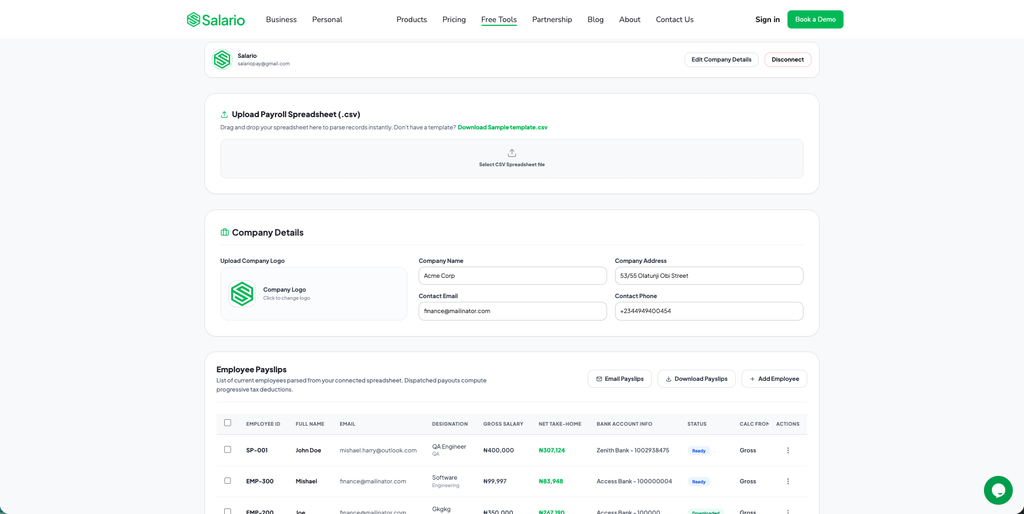
Step 1: Open Salario’s payslip generator
Go to the Salario payslip generator.
The page provides two options:
- Single Employee Payslip for one employee
- Bulk Employees Payslip for a team
Choose Bulk Employees Payslip.
Use the single option for a correction or one-off document. Use the bulk option for the normal monthly payroll run.
Step 2: Connect an approved company account
The bulk area requires an account connection before you can upload, view, download, or email employee payslips.
Use a company-controlled account rather than a personal login. Protect it with a strong password and multi-factor authentication, and restrict access to authorised HR, Finance, or payroll staff.
Step 3: Download the sample CSV template
Select Download Sample template.csv.
The template contains the headings Salario expects. Keep those headings unchanged. Do not add a title row, merge cells, insert subtotals, or create a second table in the same file.
CSV means comma-separated values. You can open and edit the file in Microsoft Excel, Google Sheets, Apple Numbers, or LibreOffice Calc.
Step 4: Add one employee per row
Copy the approved payroll data into the matching template fields. Each employee must occupy one row.
The template includes fields for:
- Employee ID and full name
- Job title and department
- Email address
- Bank name and account number
- Gross salary or target net pay
- Basic, housing, and transport percentages
- Reimbursements
- Pension, NHF, and health-insurance treatment
- Other authorised deductions
- Monthly rent information where applicable
- Relevant employee or consultant classification
Leave internal comments and unrelated approval notes out of the upload file.
Step 5: Choose the correct salary starting point
The CalcFrom field tells the generator how to interpret the amount in SalaryInput.
- Use
grosswhen the amount is the employee’s approved gross salary. - Use
netwhen the employer has approved a target take-home amount.
Do not select net merely to force a preferred result. The calculation method should match the employee’s approved compensation arrangement.
Step 6: Check the spreadsheet formatting
Before saving the file, look for:
- Duplicate employee IDs
- Duplicate employee rows
- Blank required cells
- Misspelled email addresses
- Former employees who should not be included
- Currency symbols or text inside numeric fields
- Spreadsheet errors such as
#N/Aor#VALUE! - Blank rows inside the employee list
- A totals row that could be mistaken for an employee
- Incorrect
gross,net,true, orfalsevalues
Format employee-ID and account-number columns as text before entering values. This prevents Excel from removing leading zeros.
If your spreadsheet contains formulas, keep them in the approved workbook. Paste the final approved results as values into the CSV upload copy.
Step 7: Save and upload the CSV
Save the completed worksheet as CSV. In Microsoft Excel, choose File → Save As → CSV UTF-8 (Comma delimited) where available.
Use a clear filename, such as:
Salario_Bulk_Payslips_October_2026.csv
Return to Salario and upload the file. If the upload fails, check the file type, original headings, blank rows, and numeric values before trying again.
Step 8: Review every imported record
A successful upload means the file could be read. It does not automatically mean the payroll is correct.
Confirm:
- Employee count
- Names and employee IDs
- Email addresses
- Pay period
- Gross or net calculation basis
- Salary input and structure
- Reimbursements
- PAYE and pension treatment
- Other deductions
- Final net pay
Compare the imported totals with the approved payroll register. If many records are wrong, correct the source spreadsheet and upload a clean file instead of making several disconnected manual edits.
Step 9: Download or email the payslips
When the records have been reviewed and approved, use Download Payslips to save the documents or Email Payslips to send them to employees.
Verify every delivery address before using the email option. Each employee should receive only their own payslip. Never send the complete payroll CSV or attach several employees’ documents to a group email.
Step 10: Store the final payroll record
Keep the approved payroll workbook, uploaded CSV, issued payslips, relevant approvals, payment evidence, and corrected versions in an access-controlled payroll location.
A payslip explains earnings, deductions, and net pay. It is not proof that the employee’s bank transfer succeeded, so payment evidence should be retained separately.
What Each Employee Payslip Should Show
A clear payslip should help the employee understand how gross earnings became take-home pay.
Include:
- Employer name and payroll contact
- Employee name and unique ID
- Job title or department where relevant
- Pay period and payment date
- Basic salary
- Itemised allowances and variable earnings
- Gross earnings
- PAYE and employee pension where applicable
- Other authorised deductions
- Total deductions
- Net pay
- Reimbursements shown separately where appropriate
Avoid placing unnecessary sensitive identifiers on the employee-facing document. Full BVNs, NINs, tax numbers, pension PINs, and bank account numbers generally should not be displayed without a clear operational reason. Mask sensitive details where practical.
Common Bulk-Payslip Mistakes to Avoid
Changing the CSV headings
The file may not import correctly if the headings are renamed or deleted. Start with the latest Salario sample template and preserve its structure.
Uploading an Excel workbook instead of CSV
The current bulk workflow requests .csv. Prepare the payroll in Excel if you prefer, but export the final upload sheet as CSV.
Losing leading zeros
Excel may treat account numbers and employee IDs as ordinary numbers. Format these columns as text before pasting the values.
Mixing gross and net inputs
Set CalcFrom deliberately for each employee. Using the wrong basis can produce unexpected salary and deduction results.
Applying deductions without confirming them
Do not assume every available deduction applies to every employee. Confirm the approved and current treatment before uploading payroll.
Emailing before approval
Review employee count, addresses, earnings, deductions, and net pay before distribution. Once an incorrect payslip reaches an employee, it becomes a payroll issue that must be corrected and explained.
Protect Employee Payroll Data
Employee names, salaries, emails, bank information, and deductions are confidential. Protect the spreadsheet, CSV, generated PDFs, and connected account.
Use:
- Company-controlled accounts
- Multi-factor authentication
- Access-controlled payroll folders
- A clear preparer-and-approver process
- Individual employee delivery
- Prompt access revocation when responsibilities change
- Secure deletion of unnecessary temporary files
Do not send payroll files through open chat groups or store them in unrestricted shared folders.
When a Free Bulk Generator Is Enough
A free bulk generator can work well when employee data is already organised, payroll is reviewed by authorised staff, and the business has a secure way to retain final records.
As the company grows, spreadsheets may become harder to control. Multiple versions, manual approvals, recurring corrections, employee requests for old payslips, and increasing deductions can signal that you need a more complete payroll system.
If your team is reaching that stage, compare the best payroll spreadsheet alternatives for Nigerian businesses.
Generate Bulk Payslips for Free in Nigeria with Salario
You do not need to design a separate payslip for every employee or spend hours exporting PDFs individually.
To generate bulk payslips for free in Nigeria:
- Finalise and approve the payroll.
- Download Salario’s CSV template.
- Add one employee per row.
- Save and upload the completed CSV.
- Review the imported records.
- Download or email the professional payslips.
This workflow reduces repetitive work while giving employees consistent and understandable salary documents. Generate bulk payslips for free in Nigeria with Salario.