
Running Salario payroll journal entries in Zoho Books automatically is one of the best decisions every Nigerian business owner and HR manager can make for the growth of their business. Zoho Books is a powerful cloud accounting software that simplifies invoicing, expense tracking, and financial reporting for Nigerian businesses in just a few clicks. Yet, every month-end, thousands of business owners and HR managers still waste hours copying payroll data from spreadsheets or HR tools into Zoho Books, manually creating journal entries for salaries, PAYE, NHF, pensions, and NSITF. One wrong figure or one missed liability, and you risk audit queries, delayed filings, or even penalties from Authorities.
To solve these issues and concerns of business owners, our team at Salario has worked tirelessly to build a seamless Salario and Zoho Books integration that pushes every approved payroll run straight into Zoho Books as perfect, ready-to-reconcile journal entries. No more manual entries, no more compliance panic. This article provides you with a step-by-step guide on how to automate Salario payroll journal entries in Zoho Books without the usual stress and headaches that comes with manual processes. Let’s dive in!
Overview of Salario and Zoho Books Integration
The Salario and Zoho Books integration is a native, zero-friction connection built for Nigerian businesses. Salario handles 100% local payroll requirements including state-specific PAYE, NHF, pensions, NSITF with zero errors. Zoho Books, on the other hand, handles the accounting aspect, such as invoicing clients, tracking expenses, reconciling banks, filing VAT, and producing board-ready reports.The moment you approve payroll in Salario, the integration instantly creates clean journal entries in Zoho Books: debiting salary expenses, crediting bank or cash, and setting up correct tax liabilities.
Think of Salario as the compliance engine and Zoho Books as the financial cockpit. Together, they become the ultimate Nigerian finance duo. Salario ensures accurate calculations and deductions, then automatically posts Salario payroll journal entries in Zoho Books: debiting salary expenses, crediting bank or cash, and creating exact tax liabilities. Whether you run payroll weekly or monthly, every Salario payroll journal entries in Zoho Books syncs automatically.
Reasons Why You Should Automate Salario Payroll Journal Entries in Zoho Books
Integrating Salario with Zoho Books is not just about automating the process, it revolutionizes how your HR and finance teams work together. By automating the flow of data between the two platforms, businesses wipe out the struggles of manual entry while achieving accuracy, compliance, and transparency in every financial detail.
Here are some of the reasons why you should automate Salario payroll journal entries Zoho Books:
- Eliminate Manual Entries: Every approved Salario payroll run automatically generates and posts perfect journal entries in Zoho Books. No more copying, pasting, or re-typing data.
- Real-Time Sync: The moment you click “Approve” in Salario, your Zoho Books updates instantly, keeping your financial records fresh and current without delay.
- Accurate Books: Say goodbye to mismatched numbers between HR and finance. Salario and Zoho Books stay perfectly aligned, slashing errors and stressful reconciliations.
- Easy Compliance: State-specific PAYE, NHF, pensions, and NSITF, are auto-categorized exactly as Nigerian regulators expect, making filings effortless and penalty-free.
- Simplified Auditing: Each Salario payroll journal entry in Zoho Books comes with full traceability: payroll ID, employee breakdown, and timestamps. This makes it easy for auditors to breeze through in minutes.
By syncing Salario with Zoho Books, Nigerian businesses enjoy a smooth, mistake-free process that keeps payroll and accounting perfectly aligned, from handling salaries to generating spot-on financial statements.
Step-by-Step Guide: How to Automate Salario Payroll Journal Entries in Zoho Books
To automate Salario payroll journal entries in Zoho Books, follow these easy to navigate steps:
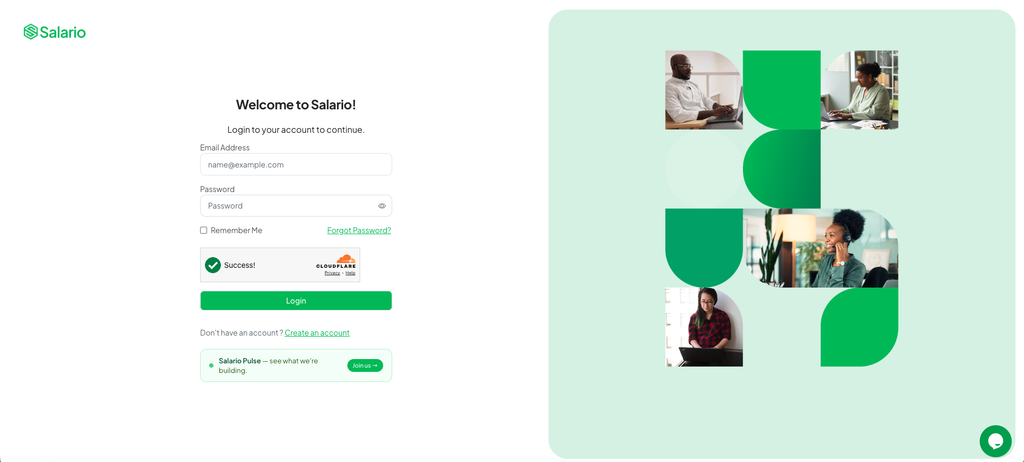
1. Login to Salario
The first step is to log in to your Salario account and click the integration icon on the left hand menu in Salario.
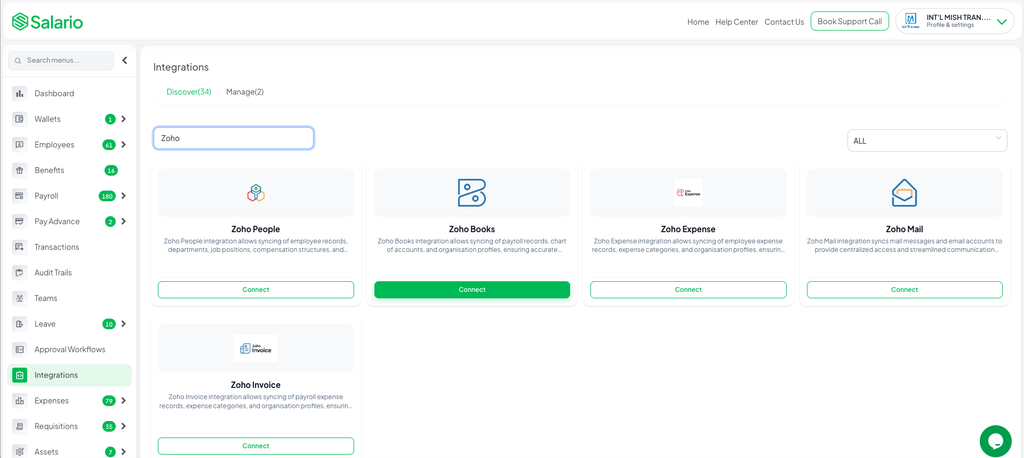
2. Select Zoho Books
Search and select Zoho Books in the list of available apps and click Connect.
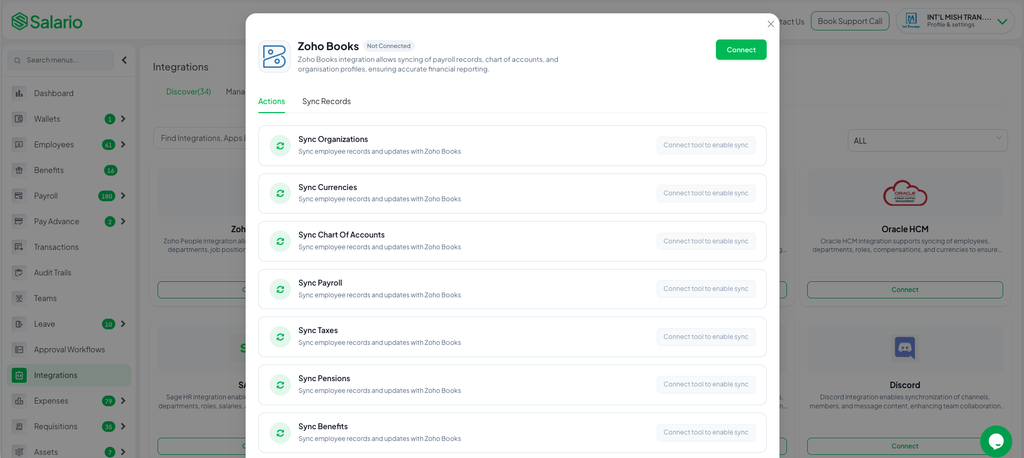
3. Verify through Zoho Books
After clicking the Connect button, you’ll be redirected to a secure Zoho’s authentication page. Review the consent screen and click Accept.
Once approved, the connection will be established and Salario will automatically import expense data like organisations, currencies, charts of accounts, payroll (salaries,taxes,pensions).
4. Sync payroll Expense from Zoho books to Salario
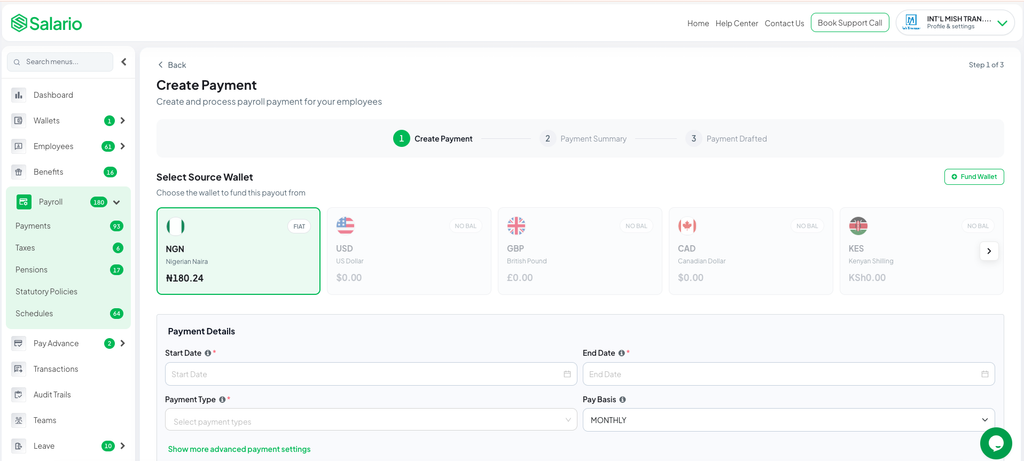
Click on the payroll icon on the left hand menu and select Create Payroll. Select the following details:
-Start Date
-End Date
-Account to Debit
-Payroll Type (e.g.,Salary,Allowance,Reimbursement,Leave)
-Pay Group (Optional)
5. Click Continue to view the payroll summary
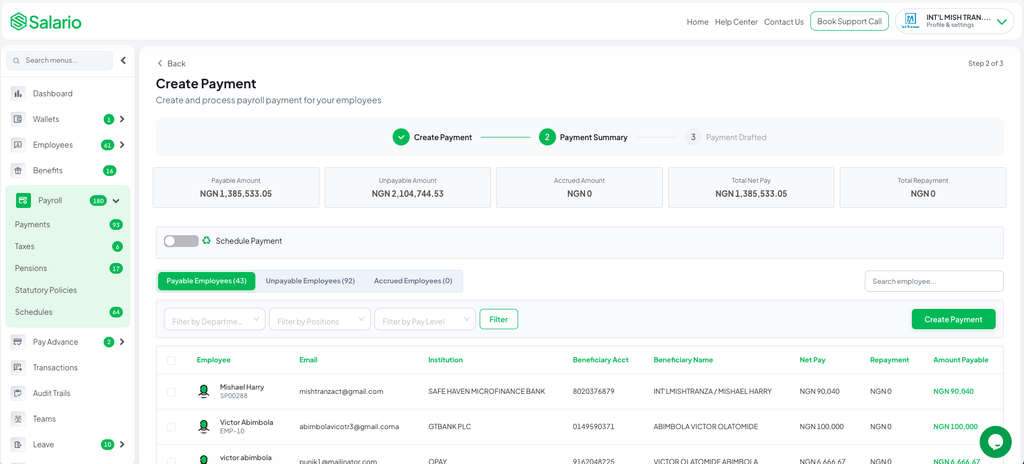
Carefully review all the details to ensure there’s no mistake. If there’s no mistake and everything looks correct, click Create Payroll. After the payroll has been created, it automatically syncs with Zoho Books.
Conclusion
Manual payroll journaling steals far more than time. It robs you of focus, invites costly mistakes, and turns every month-end into a battle against errors and deadlines. The Salario and Zoho Books integration ends that struggle for good. One simple approval in Salario delivers flawless Salario payroll journal entries in Zoho Books instantly. Imagine closing your books in minutes instead of hours. That reality is now yours. Thousands of Nigerian business owners have already made the switch and reclaimed their time. They run payroll with Salario, connect Zoho Books, and walk away knowing everything syncs perfectly. You deserve that same freedom.
Ready to explore and see how it works? Book a Demo with our team today to experience how seamless and stress free it is to automate Salario payroll journal entries in Zoho Books. You’ll wish you did earlier!